Knowledge base

Follow us and subscribe to our newsletter to keep in touch

Understanding user roles in Hermix: Guest, User, and Admin

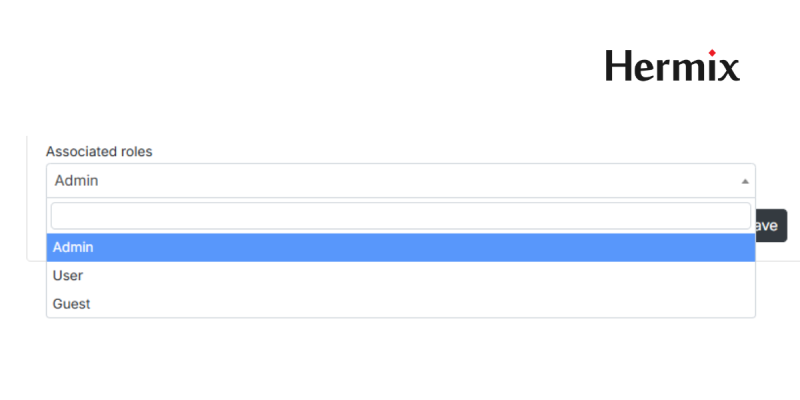
Admin, User, Guest

Hermix offers different user roles depending on how you use the platform and what level of control you need inside your organization.

Knowing the difference between Guest, User, and Admin helps you manage access efficiently and make the most of Hermix’s analytics and collaboration features.

Guest user

Guest users have access to the main features, searches, alerts, and tender monitoring, but with a few quantitative limits.

Guest users can:

  • Perform searches and monitor tenders
  • Create up to 4 active email alerts.
  • Access 1 advanced market intelligence report per month (e.g., market analytics, company or authority profiles, AI tender summarization, or commercial analyses).
  • Perform 1 Excel export per month.
  • Flag and assign up to 4 new opportunities per month.

Limitations:

  • No access to User and Admin settings.
  • Cannot create, edit, or delete users.

User

Users are full-access users in enterprise accounts. They can use Hermix without limits, but cannot manage organization settings.

Users can:

  • Perform searches, reports, exports, and opportunity management.
  • Collaborate with colleagues inside their organization.
  • Access all AI analytics and market intelligence.

Limitations:

  • Cannot create, edit, or delete users.
  • Cannot configure organization-wide settings (e.g., flag colors or labels).

Admin user

Admins have full access to both platform features and organization management. They can control users, permissions, and customization settings.

Owner users can:

  • Do everything a User can.
  • Can create, edit, or delete users.
  • Customize Hermix for the entire organization (e.g., define flag colors, labels, or workflows).

Best practices

  • Start as a Guest to explore the platform and set alerts.
  • Upgrade to User when you need continuous access to analytics and exports.
  • Assign at least one Admin in your organization to manage access and ensure settings consistency.

Examples of typical use

  • Guest: Independent consultant monitoring specific tenders.
  • User: Business developer managing daily bid activity.
  • Admin: Department head overseeing team access and customization.

Ready to get started?

Create your free account now, or check our Frequently Asked Questions (FAQ) for more guidance on using keyword search.

Create your free account and start winning public contracts, easier.


How to Get to Know Your Buyer

Applies to: All Hermix plans and features
Reading Time: 6 min
Last Updated: July 22 2025

Stop Guessing Who You Are Selling To

A bid lives or dies on how well it matches the buyer’s real priorities. Yet many teams rush into proposals without clear facts about the authority behind the notice. That blind spot costs time, margin, and credibility.

Hermix solves this with Authority Profiles. Each profile bundles years of contract data, spending patterns, and supplier history into one place so you can shape a bid that fits like a glove.

What You’ll Learn

By the end of this article, you will know how to open an Authority Profile, read its key sections, and use the insight to target, position, and win.

What You Need

Any Hermix account includes full access to Authority Profiles. Start a free trial at hermix.com/sign-up if you want to follow along.

Key Takeaways

  • Check the buyer’s history before you write a single line of your response.
  • Align price, scope, and tone with proven authority preferences.
  • Cut research time by 70 percent while improving bid relevance.

Why Buyer Context Matters

Procurement teams rarely publish everything you need inside the notice. Hidden behind the PDF are patterns that reveal:

  • How much the authority usually spends on similar work.
  • Whether they prefer long-term frameworks or one-off projects.
  • Which suppliers have built strong incumbency over time.

Ignoring that context means guessing at price and scope. Guesswork leads to either over-engineering your offer or losing on cost.

Create your free account and start winning public contracts, easier.

Inside an Authority Profile

Open any opportunity and click the buyer name. Hermix loads a profile with five tabs:

  1. About: basic details, location, contact points, and organisational hierarchy.
  2. Contracts: every award the authority issued, with values, suppliers, and dates.
  3. Business: annual spend charts, budget trends, and typical contract size.
  4. Market: supplier concentration, diversity of vendors, and renewal cycles.
  5. Opportunities: open or upcoming notices related to the same buyer.

These tabs turn an abstract public body into a data-rich customer persona.

Three-Click Workflow

  1. Click buyer name in the opportunity list.
  2. Open Authority Profile and scan the Contracts tab for repeat winners.
  3. Check Business and Market for budget range and supplier mix.

If the numbers align with your capabilities, advance the bid. If not, redirect resources to better-fit prospects.

Practical Use Cases

  • Pricing strategy: match your fee structure to the buyer’s average award value.
  • Competitive positioning: spot incumbent weaknesses and tailor win themes.
  • Account planning: identify cross-sell paths by reviewing other service categories the authority procures.

Best Practices

  • Review profiles during weekly pipeline meetings so every lead has a data checkpoint.
  • Save high-value profiles in My Files and tag them for quick team reference.
  • Combine Authority insight with AI Tender Summaries to validate both commercial and technical fit.

Common Pitfalls

  • Relying on a single large past award and ignoring smaller recurring contracts.
  • Skipping currency conversion when comparing budgets across countries.
  • Assuming an authority with many suppliers is open to new entrants without checking renewal dates.

Measuring Success

Track:

  • Win rate on bids where the team used Authority Profiles.
  • Average time saved per opportunity by replacing manual buyer research.
  • Reduction in late-stage bid withdrawals due to misaligned scope or budget.

Aim for a 20 percent lift in qualified wins within the first quarter of disciplined profile usage.

Explore a Buyer Profile Now

Open any opportunity in Hermix, click the buyer name, and let the numbers guide your next move. Accurate buyer context turns good proposals into winning ones.

Related Resources

Next Steps

  • Next knowledge base article

Advanced Features

How-to-Get-to-Know-Your-Buyer-insight

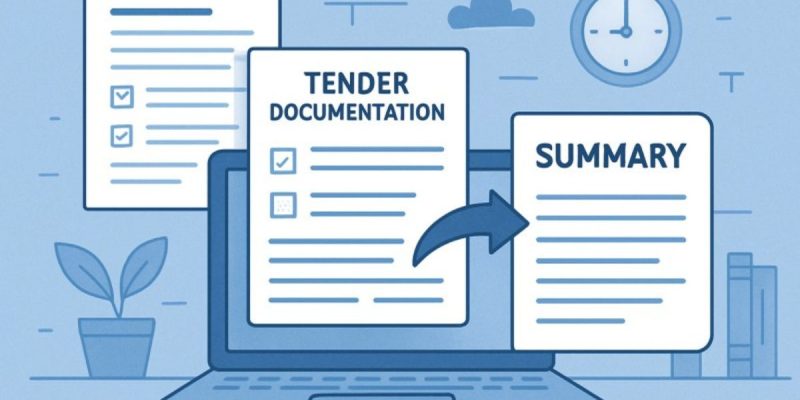
How to Summarize Tender Documentation in Seconds

Applies to: All Hermix plans and features
Reading Time: 5 min
Last Updated: July 22 2025

Skip the 300-Page Grind

Tender specifications can run beyond 300 pages. They overflow with legal references, annexes, and specialist jargon that bury the details you actually need. Reading them cover to cover steals hours from proposal work. Hermix’s AI Tender Summarization feature gives those hours back.

What You’ll Learn

By the end of this article, you’ll know how to use AI summaries to scan any tender in seconds and decide what deserves deeper attention.

What You Need

A Hermix account unlocks the summarization button on every opportunity. Start a free trial at hermix.com/sign-up if you want to follow along.

Key Takeaways

  • Generate concise summaries that highlight scope, budget, and eligibility.
  • Cut preliminary document review time by up to 85 percent.
  • Share AI summaries with teammates so everyone starts on the same page.

Why Manual Reading Fails

Traditional tender review looks like this:

  1. Download a multi-hundred-page PDF.
  2. Skim for keywords.
  3. Copy sections into a note.
  4. Hope nothing critical slips past tired eyes.

Teams often assign a senior consultant to this task, which delays higher-value work. Hermix automates the first pass so specialists can focus on strategy instead of sifting text.

Create your free account and start winning public contracts, easier.

How AI Tender Summarization Works

  1. Document Ingest
    Hermix pulls the full tender file directly from the portal. No manual downloads.
  2. Natural-Language Processing
    Our model reads the document end-to-end, extracts core elements, and flags mandatory requirements.
  3. Structured Output
    The summary lists scope, budget range, key deadlines, evaluation criteria, and eligibility checkpoints in plain language.

Accuracy tests across English, French, and Slovene tenders show 98–99 percent precision on these fields.

Three-Step Quick Scan

  1. Open any opportunity inside Hermix.
  2. Click Tender summarization.
  3. Read the summary that appears beneath the document viewer.

That is it. Super simple, right?

Practical Use Cases

  • Bid/No-Bid Triage
    Decide within minutes whether the tender suits your capabilities and price point.
  • Team Briefings
    Email the summary to legal, finance, and technical leads so everyone starts with the same facts.
  • Delegation
    Junior team members can run summaries and escalate only the tenders that match strategic criteria.

Real-World Impact

Users report saving two to three hours per medium-size tender and up to eight hours on large framework notices. Over a quarter, those hours translate into more proposals submitted and sharper qualification decisions.

Best Practices

  • Run the summary before downloading annexes.
  • Cross-check any critical figure (budget, contract length) against the source page when the tender is a top priority.
  • Store summaries in My Files so new team members see past decisions instantly.

Common Pitfalls

  • Ignoring context: always pair the summary with buyer history from the Context tab.
  • Copy-paste bids: a summary is a starting point, not a replacement for tailored proposals.
  • Single-language searches: Hermix summarises in the document’s original language, so keep multilingual skills handy for final reviews.

Measuring Success

Track:

  • Average time from tender release to initial decision.
  • Number of high-quality bid/no-bid calls made per month.
  • Team hours reallocated from reading to solution design.

Aim for an 80 percent cut in preliminary reading within your first month.

Test It Now

Open any tender in your Hermix dashboard, press Tender summarization, and see how fast clarity arrives.

Related Resources

Next Steps

  • Next knowledge base article

Advanced Features

How-to-Summarize-Tender-Documentation-in-Seconds - knowledge base

How to Know if a Public Tender Is Worth It

Applies to: All Hermix plans and features
Reading Time: 6 min
Last Updated: July 22, 2025

The Hidden Cost of Bidding Blind

Most sales teams burn weeks and sizable budgets chasing tenders that were never a realistic fit. They open 300-page specs, scramble for background data, guess the odds, then submit bids that quietly fail.

Hermix changes the starting line. Commercial qualification turns a three-day desk-research marathon into a five-minute confidence check, showing you, up front, whether an opportunity deserves the full bid treatment or a polite pass.

What You’ll Learn

By the end of this article, you’ll see how Hermix surfaces buyer history, budget signals, and competitive context so you can pursue only high-fit tenders, without reading every annex first.

What You Need

A Hermix account unlocks full qualification insights. Create a free trial at hermix.com/sign-up to follow the examples.

Key Takeaways

  • Compare every new notice with winner history, buyer spend, and pricing benchmarks.
  • Estimate win probability before committing bid resources.
  • Reclaim up to 80% of the time usually lost on low-fit tenders.

Why Most Teams Waste Time Here

Qualification is where enthusiasm collides with reality. Teams skim a summary, sense a “maybe,” and plunge into writing mode. 

Hours later, they discover:

  • The authority favours incumbent suppliers.
  • Budget caps don’t match their pricing.
  • Similar projects were recently awarded to a multi-year framework.

Late discoveries kill margins and morale. 

Hermix flips the order: information first, decision after.

How Hermix Commercial Qualification Works

1. Winner History

See which suppliers won comparable contracts, how often, and at what value. A pattern of repeat winners signals a tight incumbent grip.

2. Buyer Preferences & Budgets

Authority profiles reveal spending trends, typical contract sizes, and procurement cycles. If the buyer’s average award is €200,000 and your standard deal starts at €2 million, you know instantly it’s a mismatch.

3. Pricing Benchmarks

Hermix aggregates past award values so you can position your offer within realistic ranges, no more guess-and-stretch pricing.

4. Realistic Win Probability

By blending scope similarity, budget fit, and competitive density, Hermix estimates your chance of success. Low scores? Move on early and redeploy resources where odds are higher.

From Intake to Insight in Three Clicks

  1. Open any opportunity in your dashboard.
  2. Select the “Context” tab.
  3. Review Winners of similar contracts, Authority profile, and Similar contract awards for an instant viability snapshot.
From Intake to Insight in Three Clicks

If numbers add up, green-light the bid. If they don’t, park it and focus on higher-probability work.

Advanced Qualification Moves

  • Geo-filter competitor analysis to spot markets where local suppliers dominate.
  • Compare renewal timelines to target contracts coming off incumbents.
  • Overlay funding-source flags (EU grants vs. national budget) to tailor pricing strategy.

Real-World Impact

Teams using Hermix cut qualification time by up to 85% and double their pipeline of high-fit tenders after one quarter.

Best Practices

  • Start broad, refine fast: run winner history first, then tighten filters.
  • Log every “no-bid” reason: over time, you’ll see patterns that sharpen future monitors.
  • Pair qualification with AI summaries: confirm technical fit while commercial checks run in parallel.

Common Mistakes to Avoid

  • Chasing tenders where past awards show a single long-term supplier.
  • Ignoring budget ceilings that conflict with minimum viable pricing.
  • Treating every positive keyword hit as a green light.

Measuring Success

Track these metrics to validate your new discipline:

  • Percentage of bids submitted vs. tenders reviewed.
  • Win rate on bids pursued post-qualification.
  • Hours saved per tender by skipping low-fit opportunities.

Aim for 50% fewer bids with 30% higher win rates after your first quarter of data-driven qualification.

Explore Your Qualification Insights

Ready to see if today’s tender is worth tomorrow’s budget? Open any opportunity, switch to “Context,” and let the data decide.

Your pipeline (and your team) will thank you.

Related Resources

Next Steps

  • Next knowledge base article

Advanced Features

How to Know if a Public Tender Is Worth It - Knowledge base


How to Find Tenders That Matter: Master Hermix’s Smart Monitoring System

Applies to: All Hermix plans and features
Reading Time: 6 min read
Last Updated: July 22, 2025

Stop Wasting Half Your Workday on Irrelevant Tenders

If you’ve ever lost half a day digging through TED, SEAP, or eTendering just to find one relevant tender, you’re not alone. Public procurement professionals waste countless hours manually searching through thousands of daily tender publications across multiple portals, only to find most results don’t match their capabilities or target markets.

That’s exactly why we built Hermix’s intelligent tender monitoring system.

Instead of checking dozens of procurement portals every morning, Hermix automatically scans all major European procurement platforms and delivers only the tenders that match your specific criteria directly to your inbox.

What You’ll Accomplish

By the end of this article, you’ll know how to set up automated tender monitoring that cuts your daily research time from hours to minutes while ensuring you never miss a relevant opportunity.

What You Need

A Hermix account gives you access to our complete tender monitoring system. You can create your free trial at hermix.com/sign-up to follow along with the examples.

Key Takeaways

  • Set up intelligent filters that eliminate 90% of irrelevant results
  • Create automated daily alerts for specific markets and keywords
  • Monitor all major EU and national procurement portals from one dashboard

The Problem with Traditional Tender Searching

Most B2G sales teams follow the same painful routine every morning: manually checking TED, then their national procurement portal, maybe a few regional platforms, scrolling through hundreds of published tenders hoping to spot something relevant.

This approach fails for three reasons. 

First, it’s time-intensive. Even experienced procurement professionals need 2-3 hours daily to cover major portals effectively. 

Second, it’s inconsistent. When team members are busy with proposals or client meetings, monitoring gets skipped, and opportunities disappear. 

Third, it’s incomplete. No human can realistically track all relevant portals across multiple countries where you might have business opportunities.

Create your free account and start winning public contracts, easier.

How Hermix Tender Monitoring Works

Comprehensive Portal Coverage

Hermix monitors over 200 procurement portals across Europe, scanning thousands of daily publications. This includes major platforms like TED (EU-wide), national portals such as Germany’s procurement system, Netherlands TenderNED, Norway Doffin, Belgium BOSA, and Romania SEAP, plus regional and municipal platforms that traditional monitoring often misses.

The system processes tender documents in multiple languages, automatically extracting key information like scope, budget, deadlines, and eligibility criteria to make filtering and matching more accurate.

Intelligent Filtering System

Rather than showing every published tender, Hermix lets you create precise filters that eliminate irrelevant results before they reach your inbox:

  • Keyword matching across tender titles, descriptions, and documentation
  • CPV code filtering for specific service or product categories
  • Geographic targeting by country, region, or specific authorities
  • Budget ranges to focus on appropriately-sized opportunities
  • Authority types such as central government, municipalities, or EU institutions
  • Funding sources including EU structural funds, national budgets, or specific programs
Intelligent Filtering System

Automated Daily Delivery

Once you configure your monitoring criteria, Hermix automatically delivers matching tenders to your inbox every morning. Each alert includes tender summaries, key deadlines, authority information, and direct links to full documentation.

Setting Up Your First Tender Monitor

Navigate to Opportunities

Access the Opportunities section in your Hermix dashboard. This is where all tender monitoring and searching happens.

Navigate to Opportunities

Configure Your Search Parameters

Start by entering keywords related to your core business areas. Focus on services or products you actually deliver rather than aspirational keywords.

Step by step:

  1. Enter relevant keywords related to your business
  2. Apply filters for country, authority type, CPV codes, or funding type
  3. Click “Show opportunities” to view results
  4. Review the filtered opportunities to ensure relevance

Pro Tip: Start with broader keywords initially, then refine based on the quality of results you receive.

Test and Refine Your Filters

Review the initial results to assess relevance. If you’re seeing too many irrelevant tenders, add more specific CPV codes or geographic restrictions. If you’re missing opportunities you know should appear, broaden your keyword selection or remove restrictive filters.

The goal is finding the sweet spot where you capture all genuinely relevant opportunities without drowning in noise.

Create Your Automated Alert

When you find search criteria that produce relevant results, click the “Alert” button while viewing your filtered opportunities:

Step by step:

  1. Click the “Alert” button while viewing your filtered results
  2. Configure your preferred notification frequency (daily recommended)
  3. Confirm your email alert settings
  4. Save your monitoring profile

Expected Result: You’ll receive daily email notifications with new tenders matching your criteria, eliminating the need for manual portal checking.

Create Your Automated Alert

Advanced Monitoring Strategies

Multiple Monitor Setup

Most successful users create 3-5 different monitors covering different aspects of their business. For example, a technology company might have separate monitors for digital transformation projects, cybersecurity tenders, cloud migration contracts, and EU funding opportunities.

This approach ensures comprehensive coverage while maintaining relevance in each alert stream.

Geographic Market Expansion

Use Hermix monitoring to explore new geographic markets systematically. Set up monitors for countries where you’re considering expansion to understand market size, competition levels, typical project budgets, and procurement patterns before making significant business development investments.

Authority-Specific Monitoring

For repeat customers or target authorities, create dedicated monitors focused on specific government agencies or municipalities. This helps you track procurement patterns, budget cycles, and upcoming opportunities from buyers you already understand.

Real-World Impact and Results

Organizations using Hermix tender monitoring report significant measurable improvements in their procurement intelligence gathering:

  • 87% reduction in time spent on daily market research activities
  • 50% increase in identification of relevant opportunities
  • 200% increase in qualified leads generated through strategic market research

A typical 4-person bidding team can cover the same market scope that previously required 5 ot 6 people when leveraging automated monitoring effectively.

These improvements compound over time as your monitoring configuration becomes more refined and your team develops systematic processes around the daily alerts.

Best Practices for Maximum Success

Keyword Strategy

Start with your core service offerings as keywords, then expand based on procurement terminology commonly used in tender documents. Monitor both technical terms and business outcome descriptions.

European procurement often uses specific terminology that differs from commercial marketing language. Terms like “digitalization” instead of “digital transformation” or “interoperability” instead of “integration” can significantly affect your monitoring results.

Filter Optimization

Use geographic and authority type filters to focus on markets where you have competitive advantages or existing relationships.

Don’t try to monitor every European country initially. Focus on 2-3 target markets where you have language capabilities, regulatory understanding, or existing business relationships.

Regular Review Cycles

Establish weekly review sessions to assess new opportunities, update search criteria, and refine your monitoring strategy based on market trends.

Your monitoring setup should evolve as your business develops new capabilities, enters new markets, or identifies emerging procurement trends.

Common Implementation Mistakes

Overly Narrow Initial Searches: Starting with too specific keywords can cause you to miss relevant opportunities. Begin broadly, then refine.

Ignoring CPV Codes: Many users rely only on keyword matching, missing the precision that proper CPV code filtering provides for European procurement.

Inconsistent Monitoring: Setting up alerts but not reviewing results regularly limits the intelligence gathering benefits. Treat daily alert review as a critical business development activity. Single Monitor Approach: Trying to capture everything in one monitor usually results in either too much noise or missed opportunities.

Troubleshooting & FAQ

Q: My alerts aren’t generating relevant results
A: Review and broaden your keyword selection. Consider synonyms and alternative terminology used in public procurement.

Q: I’m getting too many irrelevant results
A: Add more specific CPV codes, geographic restrictions, or budget filters to narrow your criteria.

Q: Can I modify existing alerts?
A: Yes, return to your saved searches and adjust filters or keywords as needed to improve relevance.

Q: How many monitors should I set up?
A: Most successful users maintain 3-5 different monitors covering different business areas or geographic markets.

Measuring Your Success

Key Performance Indicators

Track these metrics to gauge your monitoring effectiveness:

  • Time reduction in daily tender research activities
  • Quality improvement in opportunity identification
  • Response speed to new relevant tenders

Opportunity pipeline growth from automated monitoring

Expected Outcomes

Well-implemented monitoring typically results in a 50% reduction in research time and improved opportunity identification through comprehensive market coverage.

Success Benchmarks

  • Daily relevant opportunity identification without manual portal checking
  • Complete European market coverage for your service areas
  • Consistent pipeline of qualified opportunities based on real market data rather than sporadic manual searching

Take Action Now

Stop losing hours every day to manual tender searching. The European public sector publishes thousands of opportunities weekly across hundreds of portals. 

Start by creating your free trial account at hermix.com/sign-up, then set up your first tender monitor today using the steps outlined above.

Your competitors are already using automated systems to identify opportunities faster than manual searching allows. The question isn’t whether to automate your tender monitoring. It’s how quickly you can implement a system that ensures you never miss relevant opportunities again.

Set up at least one monitoring alert today to begin building your competitive intelligence foundation.

Related Resources

Next Steps

  • Next knowledge base article

Advanced Features


How to begin using Hermix and win more public tenders

Applies to: All Hermix plans and features
Reading Time: 7 min read
Last Updated: July 22, 2025

Transform Your Public Sector Sales Approach

Public sector sales are challenging, as anybody working in B2G will tell you. With thousands of tenders published daily across multiple portals and complex procurement processes, finding the right opportunities feels like searching for a needle in a haystack. 

Hermix changes this approach entirely.

We provide the research, intelligence, tools, and automation needed to cut through the noise and sell into the €2 trillion European public sector market efficiently and effectively. Whether you’re an experienced government sales person in a bid team or exploring public sector opportunities for the first time, this article series will help you maximize your success with Hermix.

What You’ll Accomplish

By continuing to read, you’ll understand how to use Hermix effectively, set up automated tender monitoring, and begin qualifying opportunities with real data insights.

Prerequisites

To follow along with the examples and steps mentioned in this article, you’ll want to create a free Hermix trial account. This gives you access to all the features we’ll discuss, so you can see firsthand how the platform works for public sector sales intelligence.

You can create your account here, no questions asked: https://hermix.com/sign-up/

Key Takeaways

  • Set up smart tender monitoring across multiple EU portals
  • Access comprehensive buyer and competitor intelligence
  • Leverage AI-powered document analysis to save research time

The Power Behind Hermix

Companies like Capgemini, Indra, OTE, Fujitsu, Unisys, and Cancom trust Hermix for their public sector sales intelligence. This platform aggregates opportunities from all major EU and national procurement portals, including TED, SEAP, eTendering, Belgium BOSA, Netherlands TenderNED, Norway Doffin, and Germany.

Hermix provides access to +8 million public sector contracts across Europe, along with 1.2 million company profiles and 170,000 authority profiles. This wealth of data enables strategic planning, pipeline creation, and competitive analysis that would be impossible to gather manually.

Create your free account and start winning public contracts, easier.

Getting Started: Your First Steps

Create Your Hermix Trial Account

Begin by visiting hermix.com/sign-up to create your trial account. This gives you full access to explore all Hermix features during your trial period.

Log into your Hermix account and familiarize yourself with the main interface. The dashboard serves as your command center for all public sector opportunities and market intelligence.

Expected Result: You’ll see an overview of your account status, recent activity, and quick access to key features.

Create Your Hermix Trial Account

Navigate Your Dashboard

Your dashboard serves as the command center for all public sector opportunities and market intelligence. The platform’s clean interface provides immediate access to opportunity monitoring, market analysis, and collaboration tools.

Navigate Your Dashboard

Run Your First Opportunity Search

Access the Opportunities section to explore available tenders. Enter keywords related to your business sector and apply relevant filters for country, authority type, CPV codes, or funding type. The results will be significantly cleaner and more targeted compared to traditional portal searches, showing relevant tenders from across Europe in one unified view.

Step by step:

  1. Enter relevant keywords related to your business
  2. Apply filters for country, authority type, CPV codes, or funding type
  3. Click “Show opportunities” to view results
  4. Review the filtered opportunities to ensure relevance

Pro Tip: Start with broader keywords initially, then refine based on the results you receive.

Run Your First Opportunity Search

Set Up Automated Monitoring

When you find search criteria that produce relevant results, click the “Alert” button while viewing your filtered opportunities. Configure your preferred notification frequency and save your monitoring configuration. Daily email notifications will automatically deliver new tenders matching your criteria, eliminating the need for manual portal checking across multiple European procurement platforms.
Step by step:

  1. Click the “Alert” button while viewing your filtered results
  2. Configure your preferred notification frequency (daily recommended)
  3. Confirm your email alert settings
  4. Save your monitoring profile

Expected Result: You’ll receive daily email notifications with new tenders matching your criteria, eliminating the need for manual portal checking.

Set Up Automated Monitoring

Core Capabilities That Drive Results

AI-Powered Document Analysis

Hermix’s AI Tender Summarization feature analyzes complex tender documents in multiple languages, extracting key information like scope, budget, and eligibility criteria. Testing has shown 98-99% accuracy for tender analysis across languages including English, French, and Slovene.

This capability transforms hours of document review into minutes of targeted analysis. For any tender document, you can generate summaries that answer critical questions like objectives, budget, award criteria, required experts, and eligibility requirements without reading through hundreds of pages.

Commercial Qualification Intelligence

For any opportunity, Hermix provides access to:

  • Winners of similar contracts and their geographic distribution
  • Authority profiles showing past tenders and spending patterns
  • Previous relevant projects with budgets and duration
  • Competition analysis to assess your market position

This intelligence enables strategic positioning that goes far beyond intuition-based bidding decisions.

How to:

  1. Open the tender details page
  2. Navigate to the “Context” tab
  3. Review the “Winners of similar contracts” section
  4. Examine authority profiles, similar open tenders, and contractor analysis
  5. Use this intelligence to assess your competitive position

Market Intelligence and Analytics

The platform offers comprehensive market analytics segmented by country, authority type, and industry domain. You can analyze contractors active in the European public sector market, compare your company against competition, and identify compatible partners based on historical performance data.

Real-World Impact and Results

Well-implemented Hermix usage typically delivers significant, measurable improvements. Users report an 87% reduction in time spent on market research activities and an 85% reduction in tender summary analysis time. The platform enables a 200% increase in qualified leads generated through strategic market research and a 50% increase in the identification of relevant opportunities.

These aren’t theoretical benefits. Teams using Hermix consistently report that a 4-person sales/presales team can deliver the work of 6 people when leveraging the platform’s automation and intelligence capabilities.

Advanced Features for Team Collaboration

Hermix includes robust collaboration tools designed for B2G sales teams. Shared flags and bookmarks enable opportunity tracking across team members. The platform’s “My Files” feature provides personal document management, while ZIP archive downloads streamline document handling. Custom flags help create qualification workflows that keep entire teams aligned on opportunity status and next steps.

Making Your First Trial Count

Success with Hermix starts with consistent usage and strategic setup. Focus on configuring monitoring alerts that match your core business offerings, then expand based on market opportunities you discover. Use authority intelligence to understand buyer patterns before deciding to bid on opportunities.

Best Practices for Maximum Success

Keyword Strategy

Start with your core service offerings as keywords, then expand based on procurement terminology commonly used in tender documents. Monitor both technical terms and business outcome descriptions.

Filter Optimization

Use geographic and authority type filters to focus on markets where you have competitive advantages or existing relationships.

Regular Review Cycles

Establish weekly review sessions to assess new opportunities, update search criteria, and refine your monitoring strategy based on market trends.

Team Collaboration

Leverage shared bookmarks and flags to ensure all team members stay informed about relevant opportunities and qualification progress.

Documentation and Analysis

Use the export features to maintain records of analyzed opportunities for pattern recognition and strategy refinement.

Common Implementation Mistakes

Overly Narrow Initial Searches: Starting with too specific keywords can cause you to miss relevant opportunities. Begin broadly, then refine.

Ignoring Authority Intelligence: Failing to review buyer profiles before bidding reduces your competitive positioning effectiveness.

Inconsistent Monitoring: Sporadic platform usage limits the intelligence gathering benefits. Establish regular review routines.

Troubleshooting & FAQ

Q: My alerts aren’t generating relevant results
A: Review and broaden your keyword selection. Consider synonyms and alternative terminology used in public procurement.

Q: How do I interpret authority spending patterns?
A: Focus on contract values, frequency of similar purchases, and successful supplier profiles to gauge market fit.Q: Can I modify existing alerts?
A: Yes, return to your saved searches and adjust filters or keywords as needed to improve relevance.

Measuring Your Success

Key Performance Indicators

Track these metrics to gauge your Hermix implementation effectiveness:

  • Time reduction in daily tender research activities
  • Quality improvement in opportunity identification
  • Response speed to new relevant tenders
  • Win rate changes after implementing intelligence-driven qualification

Expected Outcomes

Well-implemented Hermix usage typically results in a 50% reduction in research time and improved bid qualification accuracy through access to comprehensive market intelligence.

Success Benchmarks

  • Daily relevant opportunity identification without manual portal checking
  • Complete buyer and competitor analysis finished within 15 minutes per opportunity
  • Qualified opportunity pipeline based on data-driven insights rather than intuition

Take Action Now

Success in public sector sales requires consistent intelligence gathering and strategic opportunity qualification. Start by creating your free trial account here: https://hermix.com/sign-up/, log into your Hermix dashboard, and run your first targeted search. 

Set up at least one monitoring alert today to begin building your competitive intelligence foundation.

The difference between winning and losing in public procurement often comes down to information quality and timing. Hermix provides both, now it’s time to put these capabilities to work for your business growth.

Start your trial today and discover how data-driven intelligence can transform your approach to the €2 trillion European public sector market.

Related Resources

Next Steps

  • Next knowledge base article

Advanced Features

How to begin using Hermix and win more public tenders - Knowledge base